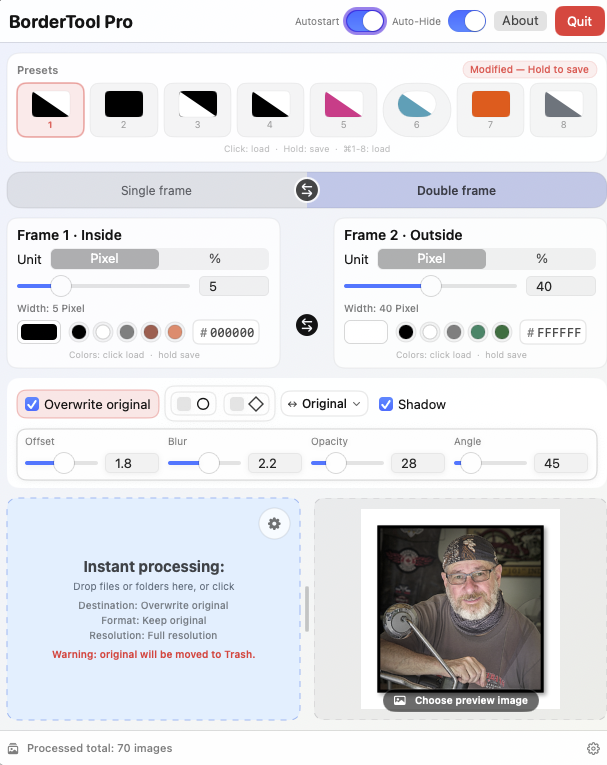
My new favourite tool!
When you’ve finished refining an image and it looks just right, the next instinct is often to share it online, whether on social media or your website. I’ve always liked the clean look of a simple border to help accent the image — a black border for lighter photos, or a white border for darker ones — a subtle touch that helps the picture stand out from the surrounding page.

I’ve been using Michael’s border tool for quite some time. You could simply drag an image onto an icon that applied a set pixel amount of border in either black or white—quick and effortless. You could even drag the image onto a different icon to add a second border for a layered look. Beautiful and convenient.
Quite recently, Michael has significantly updated the application with a sleek, professional user interface and added flexible options to create Single or Double borders in any colour, along with choices for rounded corners, shadows, and other stylistic tweaks. You can preview the image before accepting the changes, or simply drag an entire folder of images in for instant, batch processing.
I’ve added Mac BorderTool Pro to my CAPTURE ONE export so the selected border design is applied automatically during export — no dragging and dropping required. It’s a real time saver that streamlines my workflow beautifully and keeps my files consistent. It also integrates with LIGHTROOM, so I can use the same borders across different editing platforms.
Michael is based out of Germany, but speaks and writes English extremely well, so support is no problem and he’s very responsive to questions. Best of all, it’s a one-time purchase — very reasonably priced — I’d even say cheap, but not in a low-quality way; this is a truly professional-grade application.
You can check out BorderTool Pro on his website at https://www.pixelcatcher.de/en/produkt/mac-bordertool-pro/
Be sure to switch to English unless you can read German.